
- 27日8月2022年
MARS4 | Is it useful for gameplay if you know? |Basic knowledge for beginner to intermediate level
MARS4MARS4 |Basic knowledg……

P2E
Introducing this time is a metaverse game that incorporates a blockchain set in Mars. Since the demo play has just started, please keep in mind that everything you can do is not open. In addition, we will also introduce operation methods and priorities.
This MARS4 is a game equipped with Unreal Engine based on NASA’s Mars terrain data.

What you can see by actually playing it is that you can play in realistic and beautiful images comparable to Playstation games and Xbox games.
【目次】
First of all, for those who are new to P2E, I’m a super beginner, and I would like to explain … P2E (Play to Earn) Play to Earn That is.
In other words, you earn while playing games.
Is it gambling?

Some people may think about it.
The answer is no.
It is the feeling of people of the Showa generation like me that games are “toys” that are fun to play at the player’s pace.
Then what kind of mechanism is it?
Earning does not mean earning JPY (money), but earning tokens (currency) used in the game.
Most of these tokens are virtual currencies or have a mechanism that can be exchanged for virtual currencies.
By exchanging the earned tokens from virtual currency to yen, it becomes an act of earning in the end.
I see! But it seems to be difficult.
Sure, you need to study a little at first. However, let’s think about it.
Did you feel some resistance when you switched from a feature phone to a smartphone? Can you imagine the time when you would look at the phone all day long?
When you say that, it seems like you remember …
As the times progress, we move in a higher direction. By learning more or less, people have become able to use various things.
However, the world of cryptocurrencies is not essential. When considering asset management, it only exists as one of the options.
The attractiveness of savings has declined sharply, and it is no exaggeration to say that this is an era that is no different from Tansu savings. Because of such an era, various things have been born as a means of asset management. It is an era in which even the hard earned money will work for the future.
After studying well and understanding the risks, let’s make decisions at your own risk and take action.
In order to play with MARS4, you will have to step into the world of virtual currency, so you need to prepare accordingly. This game is a P2E (Play to Earn) play-to-earn game that has become more common in the last few years.
I myself have about 6 years of experience in stocks, ETFs, investment trusts, etc., but I am a young priest who just made his debut in April 2022 regarding cryptocurrencies. Although he is actually in the middle of 50 years old. (^^;)
So, I would like to introduce my favorite YouTuber that I have been watching for information gathering recently, so please refer to it.
[blogcard url=”https://youtu.be/WBRewOvf0Lo″]
[blogcard url=”https://youtu.be/swljiuRzDMQ″]
[blogcard url=”https://youtu.be/68Cmrt2JnOY″]
In order to play in demo play, you must own the land NFT on Mars. In the future, even if you do not own a land NFT, characters wearing space suits will be distributed for free.
As a guess, even if you play with free characters, you may need to have a wallet for cryptocurrencies called a wallet to connect to the game.
A typical wallet is called MetaMask, which is explained in the video introduced earlier, so please refer to it. ↓ ↓ ↓
[blogcard url=”https://youtu.be/WBRewOvf0Lo″]
In most cases, the new P2E games are in English.
[blogcard url=”https://www.mars4.me/″]
Accessing MARS4 from the top bar opens a page like the one below. As some of you may know, if you are using chrome or Microsoft Edge, you can scroll the screen to the bottom and right-click near the footer to “translate to Japanese“.


If you decide to buy a land NFT, we recommend buying it from a 3D exploration (fourth from the left) instead of the Martian NFT (second from the left).
You can get a discount by using the link below, so please use it.
[blogcard url=”https://app.mars4.me/nft-sale?ref=nfle5gbq27″]
Click the link above to display the screen below. If you copy the discount code here and click the MARS4 logo on the upper left of the screen, a 3D search will appear in the header.
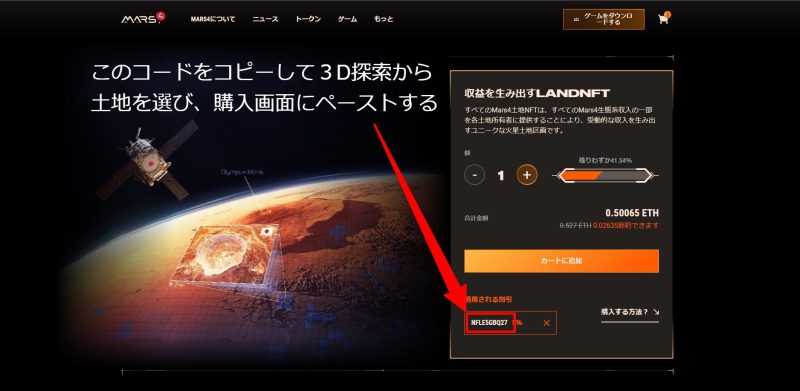

Returning to the story, you can see the reason why we recommend purchasing from “3D exploration” instead of purchasing from “NFT on Mars” by looking at the screen below.
If you purchase from “NFT on Mars”, the land will be allocated appropriately.

However, by purchasing from “3D Search”, you can choose the location yourself. I think this has a big advantage. Even if there is a price difference due to the size of the land, the price does not change depending on the location.
Land NFTs can be rented or sold to people, but it seems that the value tends to increase near large craters and land owned by famous companies and celebrities. It’s a personal speculation, but I think that purchasing near a large crater may increase the value of land NFTs in the future.

If you own a land NFT, connect the wallet you used to buy, such as MetaMask, and click “Games”.

The land NFT purchase screen will be displayed suddenly, but you should be able to reach the place where you can download the game by scrolling down. Currently, there is only a Windows version, but it seems that a Mac version will be available for download in the future.

If you click “How to play” on the right side of the download button, there are recommended specifications for your PC, so let’s refer to them. It seems that it is okay if the grabbo has a hard drive space of 970 GTX or more, RAM 12 gb, 30 GB or more.

When MARS4 is downloaded and installed, an icon will appear. Double-click it.

When MARS4 starts, update it first. This takes a lot of time, so it is recommended to execute only update in advance, not just before playing. When the update is complete, it’s finally play.

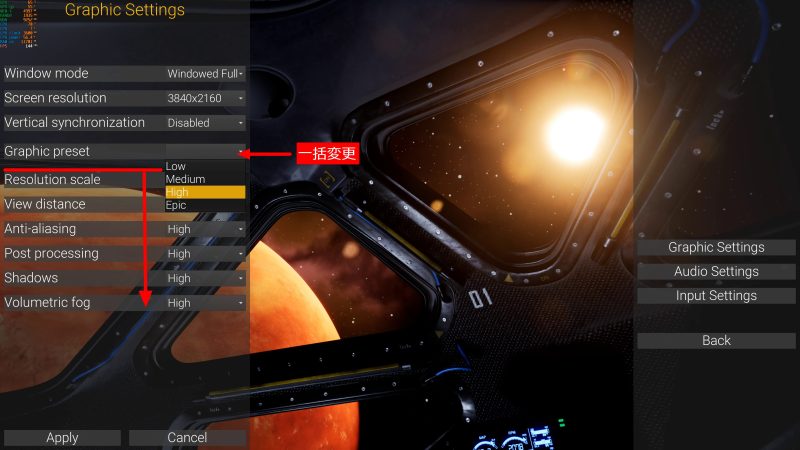
When the game starts, the screen below will appear. First, check / change the graphics and operation keys in settings. The small characters displayed in the upper left of the screen are not displayed on MARS4 itself, but the CPU / GPU operating rate and temperature are monitored by another software.

Of note on the settings screen are the Grephic Setting and Input Setting.
The graphic setting is an item that adjusts the resolution of the image displayed on the monitor, and the load on the PC is determined by this adjustment content.
Input settings are items that allow you to change the character operation keys in the game. It is possible to check and change during the game, but it is recommended to take a look before starting.

As I mentioned earlier, graphic settings are important.
The load on the PC is determined by this setting value. Screen resolution automatically recognizes the connected monitor and allows you to select an option. Considering the load on the PC, I set the Screen resolution to the maximum value and the graphic preset to High.
When you start the game, you will see a scene like the one in the image below. Initially, ensuring oxygen supply is a top priority. The exploration will be postponed and the quest will be advanced in a hurry, while building a state where oxygen supply can be secured.

Securing oxygen and body temperature is paramount to surviving on Mars. The table below is the explanation of the screen.
| oxygen | It decreases over time, and when the gauge reaches 0, your physical strength begins to decrease. |
| Body temperature | It goes up and down under the influence of the outside air, and when the gauge reaches 0, the physical strength begins to decrease. |
| Physical fitness | You will die when this gauge reaches 0. It decreases due to fall damage, lack of oxygen, and hypothermia. |
| stamina | It decreases when you run or mine. In the current version, we could not confirm the decrease to the extent that we were concerned. |
| Minimap | It is linked to the movement of the character. |
| quest | It’s something to do. |
| Hot bar slot | By setting the item here, you can use the character. |
If you are new to PC games, you may not be able to tell just by looking at the input settings. That is how to open the menu during the game and switch the hot bar slot.
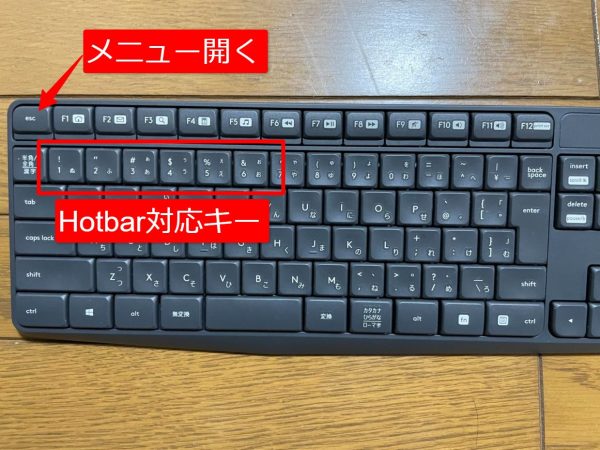
To explain with my cheap keyboard, the “esc” key opens the menu during the game.
And since the number is set by default for switching the hot bar slot, tap the number on the keyboard to switch.
At first, you may adjust the resolution while playing. Let’s adjust the Graphic preset while considering the load on the PC.
Once you’ve decided on your settings, don’t forget to click Apply. If you forget this, the changed settings will not prosper.

Change frequently used keys to make them easier to use. When you click the corresponding key you want to change, it becomes …, so tap the desired key and click Apply to change it.

The first quest is to get an oxygen cylinder and replenish it. Move to the place marked with ◇ on the screen and pick it up with the E key.

Then use the I key to open the inventory and drag the oxygen cylinder to the hotbar slot.
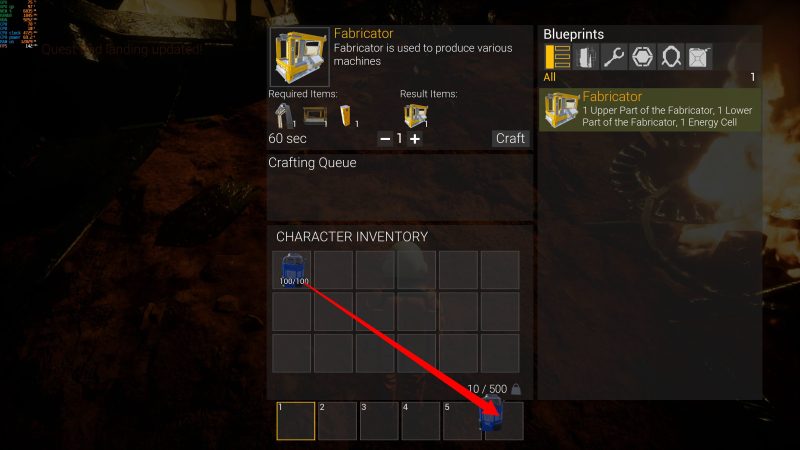
Select the oxygen cylinder that you just moved to the hot bar slot and left-click to replenish oxygen.

The next goal is to get the contents of the chest. It will be marked in 2 places, so get it from the front.


When you interact with the E key, the chest inventory and character inventory will be displayed on the screen. Click Take all on the chest side to move all items to the character’s inventory.


Once you have all the items from the two chests, you can craft a device called Fabrecator. It is a device that can produce some important devices necessary for surviving on Mars.
Open your inventory with the I key and craft it right away.


Next, set the tools and items that you think you will use frequently in the hot bar. Examples include ice axes, shovels, craft tools, and oxygen cylinders.
Use the corresponding keys on the keyboard (default is numbers) to switch between them.

On Mars during demo play, there are rocks that are destructible and rocks that are not.
If you destroy a rock with an ice ax, mineral resources such as iron will come out. Collect this. In particular, iron is used in large quantities, so in the early stages it is like mining if you have time. Scoops are used to dig the ground and collect sand and the like.
The work is like left-clicking to shake the mining tool and collecting it with E.

Crushing rocks can often cause mineral resources to scatter.
Among various minerals, I felt that silicon (white and round egg-like shape) was especially valuable. IfIf you look only at the required number in crafting, it is not many, but if you craft the necessary equipment and things, you will often run out. In other words, the amount that can be mined is overwhelmingly smaller than the total required quantity.
If a white, round object pops out, immediately chase it and collect it.


You have to find a place to build the base while collecting mineral resources. It is necessary to collect mineral resources, construct a base, and create equipment in parallel until a heater is installed to secure oxygen and keep warm.
Only two oxygen cylinders were initially obtained, and an oxygen filling device must be installed before they are used up.

With a tablet-like device set in the hot bar 3, we will install the parts that will be the framework of the base. The parts that form the framework consume iron minerals and are crafted.

Don’t forget to install the solar battery charger you got. Set this in an empty place of the hot bar, and switch the hot bar with the corresponding key to install it.

Set the battery with 0 charge in the charging device and turn on to start charging. The battery is necessary to operate the device, and no matter how much it is, it is not enough.
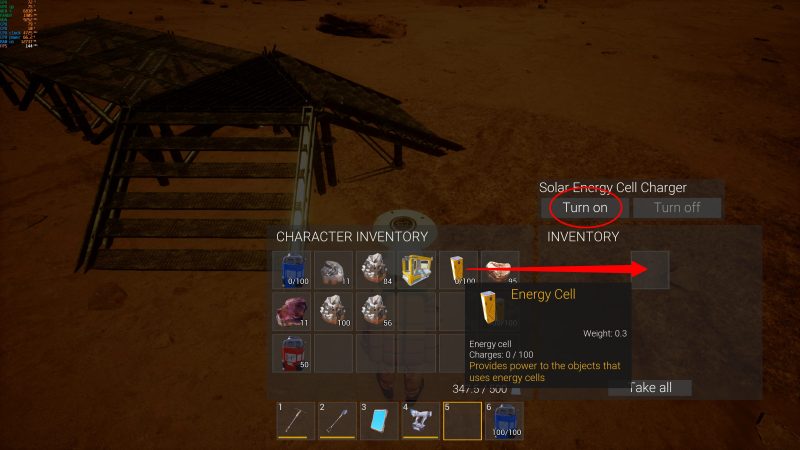
The action when the charging device is started is sober and cool.

The Fabrecator, Arc Furnace (a device that makes minerals ready for processing), and the oxygen filling device, which have been completed, will lay the foundation for the base with a minimum floor plan that can be installed.

Once the foundation is in place, install the Fabrecator and instruct the Fabrecator to manufacture the Arc Furnace. It should be noted here that a battery is required to operate the Fabrecator itself.


As an example, let’s take the time of manufacture of Arc Furnace as an example.
Looking at the image below, you need 20 iron minerals and a fully charged battery. Even if you put only this material in the inventory of the device and start crafting, the countdown to completion will stop and it will not proceed.
So if you start by putting two fully charged batteries and iron minerals in your inventory, 20 iron and one battery will be consumed from the inventory and the other fully charged battery will have 100/100 remaining capacity. → It became 99/100. This battery consumption is the energy required to operate Fabrecator.

There is still a shortage of minerals. While waiting for the production of Arc Furnace, we will complete the recovery work and the skeleton of the base again.

There are three types of skeleton wall parts: walls, walls with windows, and walls for door installation. Let’s install a wall for the door at the entrance of the base.
Ultimately, we will build a closed space.

When the arc furnace is completed, it will be installed, and minerals and batteries will be set and processed into metal lumps. From here, we will start preparing because we will use a large amount of iron lumps.
Free time is construction, battery replacement and charging.

Once you have 20 iron lumps, it’s time to start manufacturing the oxygen cylinder replenisher.

Since you have two batteries on hand, you may not have one fully charged battery and a usable battery to manufacture.
In that case, it’s a good idea to make a spare battery while charging the battery. When I played the demo, I felt that I needed at least 6 batteries.
Of course, we have to consider adding more charging devices accordingly.

After charging the battery, it is time to start manufacturing the oxygen cylinder replenisher. Don’t forget to build and recover mineral resources while waiting!

I finally got here. Set the empty oxygen cylinder in the device and replenish it.


Shortly after breathing, the next step is to manufacture heaters. If you don’t do it early, the night of Mars will come.
The temperature on Mars ranges from a maximum of 30 ° C to a minimum of -140 ° C, according to NASA data. You cannot see the morning sun without a heater.

Evolve your base into a closed space until the heater is complete. With a device like a handy sonar, you can upgrade, destroy, and change the orientation of the skeleton. From here, we will consume the iron lumps and upgrade the skeleton.
Of course, if we do not recover mineral resources at the same time, we will not have enough iron.
Don’t forget to craft the door with the fabricator.

It was completed before it froze and died. Install it near the equipment that you will work frequently and operate it.

The next goal is to craft an oxygen generator. This device can be operated only in a closed space, and it is possible to breathe without an oxygen cylinder. You need a battery to operate the device, so be careful not to run out of battery.

We will keep closing the base. When upgrading, if the wall orientation is reversed, change it.


After installing the oxygen generator, let’s put it into operation. At this time, it is proof that the space is not closed unless it operates. Check for leaks in wall / floor / roof upgrades, door opening, etc. and make it ready for operation.

When the oxygen generator is activated, something like exhaust gas will be ejected, but don’t worry! The decrease in the oxygen level gauge should have stopped properly.

Items can no longer be carried, and items with a yellow gauge under the icon, such as ice axes and shovels, are consumables.
It will eventually break, so craft at least one storage box so that you can craft and set aside spares.
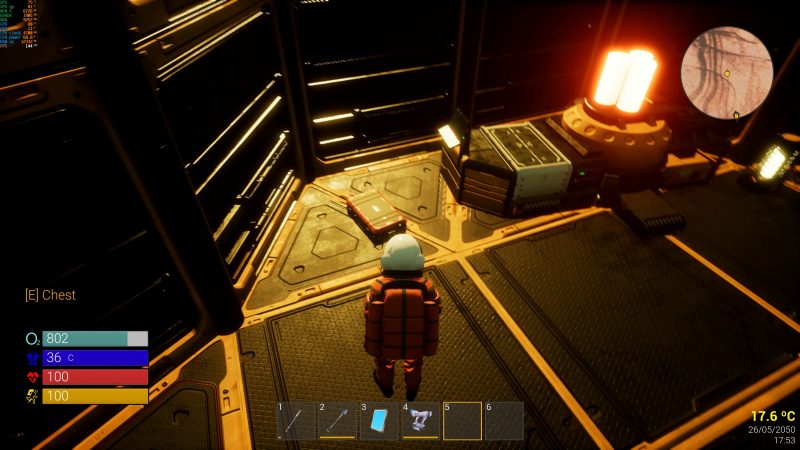
Once the base is complete, exploration and crafting of other equipment awaits. It would be good to start with equipment that can craft lighting and furniture while preparing necessary items such as batteries.
From here, you can enjoy life on Mars at your own pace.


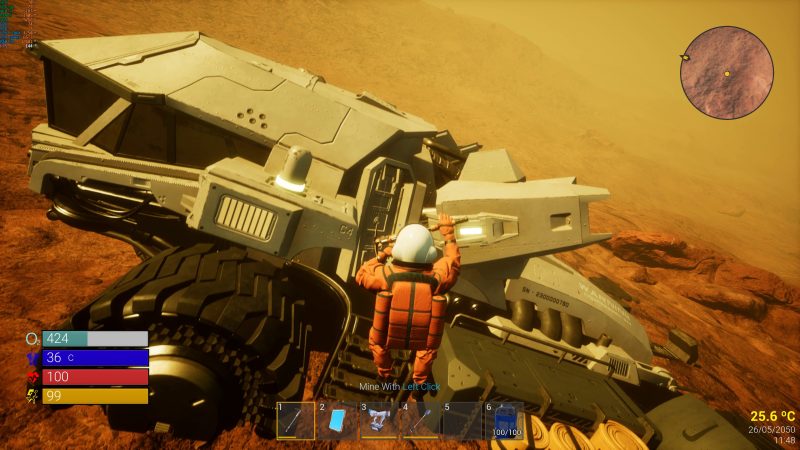
If you go out, you will find such a vehicle. I couldn’t board it, but it’s definitely a vehicle I’ve seen in past introductory videos.
Finally, I would like to explain a little about save games. When you open the menu with the ESC key, you have the option of Save. Click this to change to the screen below. Here, when manually saving, it is also possible to create a Save file and save each data. As shown in the image below, if you enter a name and save it, it will be displayed as a file above.
We have not confirmed how many files can be created, but it can be said to be a convenient function when redoing.

At first, I suffered from lack of knowledge of English, but as I played while using the translation function of Google Camera, my understanding gradually deepened. When I watched the YouTube video of the development team, I often understood it if I watched the operation even if I could not understand the words.
To some extent, by the time you understand crafting operations, you will find yourself crazy about mining and crafting.
Since it is only equipped with Unreal Engine, the world of MARS4 is beautiful and the frame rate is maintained at about 140 FPS, so the movement is smooth. In other words, it is clear that MASR4 is being completed as a high-quality game if it is a poor game equivalent to a consumer game.
There was also an announcement from the management and development team that “in the future, we will distribute free characters even if you do not own a land NFT.” I felt that it was not bad to play for the purpose of purely enjoying the game, not as P2E.
I felt that the world of MARS4 has something to immerse in the act of purely playing.
Thank you for browsing to the end.


Born in 1967, just an ordinary person who likes games. A blog I started as a hobby after retirement. We mainly take up Playstation and PC games, and post real-life experiences and petite strategies. From 2023, we are working to focus a little more on YouTube. Please drop in with the intention of killing time.
MARS4MARS4 |Basic knowledg……
P2E MARS4 | Basic knowledge of……
MARS4MARS4 | How to check ……
MARS4MARS4 |Procedure to m……


